Yes! The rumors are true. I did 4 years of work in half a day, while on PTO. Luckily for everyone, today I’m going to open up the chamber of secrets and walk through what you need to do to get on my level.
In all seriousness, I don’t claim to know what the best coding and data development workflow is. Honestly, I don’t think anyone really knows what’s best right now — things are changing so fast. But I wanted to write up what’s been working for me, and I’d love to hear how it compares with others.
My setup, in one line: Pi + Herdr + about 20 agents, orchestrated.
Pi
I use Pi for my agent client (think of it like Claude Code or OpenCode). It is a minimal agent harness that provides a package manager to easily load skills, plugins, and extensions. Compared to Claude Code it has a lot more customization, and starts without any fancy features. Because you start with nothing, you can add only the features you actually use, and this is a surprisingly big benefit because it makes the context window slimmer. I found when switching from Claude Code that it was about 10% better in terms of quality of results, which I attribute to the smaller context window.
I use three packages:
- A model provider package. This is the main requirement to get started. Once hooked up to your company’s model proxy, you get every model the proxy exposes.
- An MCP adapter. If you want any connectivity to your team’s tools, you’ll want this — docs search, analytics, experiment flags, task tracking, orchestration, whatever your team actually uses.
- Herdr. I’ll explain this below.
Herdr
I think of Herdr as tmux for agents. It allows the agents to manage the terminal window, by setting up and maintaining:
- Spaces. These are different workspaces that group all your agents together. I typically roll with 2 workspaces that are completely isolated from each other, each focused on a different repository (although they can work on any repo).
- Tabs. Within a space, tabs define the next level of grouping of agents, and as you’d expect, each tab is a new navigation button at the top of the screen.
- Panes. Within a tab, these define the agent sessions. There can be just one pane within a tab, or you can create different window splits. I often ask the agent to create a vertical split to display artifacts on the right-hand side of the screen, similar to a chat UI where the document is on the right and the dialog is on the left.
These concepts aren’t novel, but the integration with Pi and LLMs is what’s useful. You don’t really need to set up any of the navigation manually. Just ask the agent to self-organize and it’ll be able to choose the tab and pane structure that is best for your goal.
Other than the self-managing organization power of Herdr, the other thing I really like is that it’s great at visually indicating when an agent session is currently working, has an unread result, or is waiting for action. On the left hand side of the layout you can quickly see all sessions across all workspaces, and I often use that to know when action is needed from me.
Knowledge
One of the important things to set up in all repositories is a way for the agent to compile and share knowledge with other concurrent and future agents. You want to make sure that the agents aren’t duplicating each other’s work and that the work itself is compounding.
The way I set this up is:
- Every repository the agents work in has a
workingdirectory, and I haveworkingin my global gitignore. workinghas the following subdirectories:- Threads. These essentially map to an agent session, the smallest unit of work. When a new agent is set up, it always creates a new folder here. All of its intermediate work and findings go into this thread directory. These are critical to make sure things don’t ever get lost. Technically Pi has its own concept of resuming sessions, but I prefer to do it in our own way.
- Plans. These hold all of the future plans of work. These plans can be at any granularity — across multiple threads and agents, or just for a single thread. The main reason they’re important is so that all the agents can get a feel for the project scope and where they fit in. And it allows me to review the plans myself manually.
- Facts. Plans and threads are generally more ephemeral and need to be cleaned up regularly. Facts contains the persistent knowledge that we find and want to keep long term. Facts can be self-organized as new files, but there is one core file holding the strictest truths — each entry dated and sourced, so agents never have to guess at settled facts.
- Tools. These are local tools and scripts the agent can use. Notably, a small script that lets agents edit Google Docs directly.
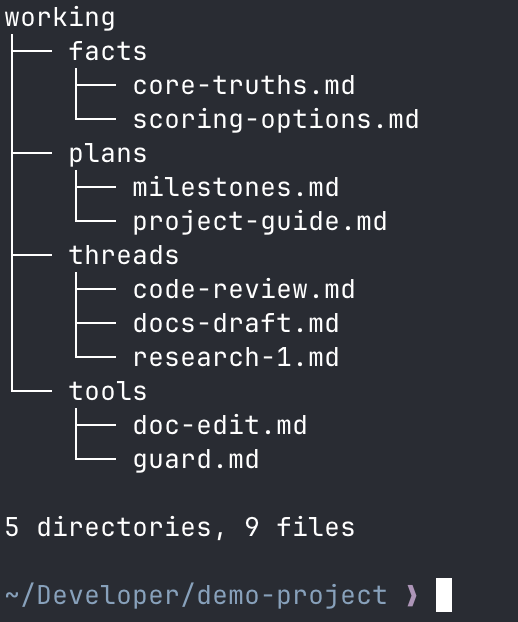
The working/ tree for the demo project.
Orchestration
When I start a new workspace, I typically call the first tab the “orchestrator”. It is the main dialog that I talk to for that workspace. I tell the orchestrator what the workspace and its focus are, and I ask it to spin up a vertical split pane that contains the current goal and all TODOs. I usually ask it to build a plan for the goal it’s focused on, and then ask it to create new agents in new tabs that parallelize to complete the work.
I typically roll with 2 workspaces, each having one orchestrator that manages 9 other agents. That’s about the number of agents where you constantly have something you need to check in on.
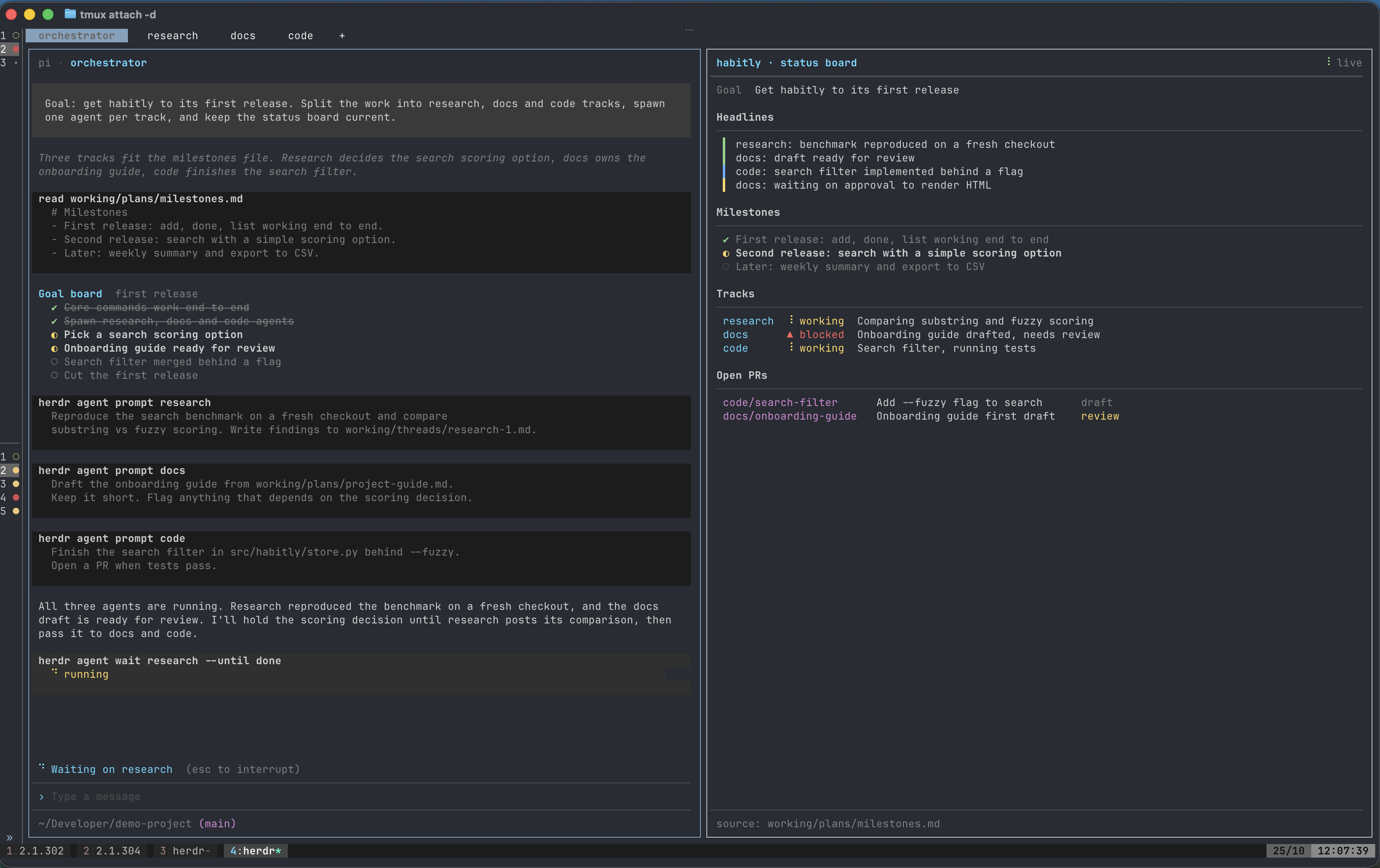
The orchestrator (left) and its live status board (right) for the demo project.
Pi does have a subagent package you can use, which I explored for a bit. However, I find that the setup above — where the “subagents” are just new agent tabs — is much easier to work with. It means that if I want to skip the orchestrator and dive specifically into a sub work item, I can just click the tab and talk to it directly. This kind of goes with the Pi philosophy: you don’t need plugins for everything, you just need to ask Pi to do the thing you want and it will do it.
Workflows
Here are the three places where this setup has paid off the most.
Research: when you have a benchmark you can trust
Agents work best when there’s an offline, reproducible benchmark they can iterate on endlessly. ML work is a clear case. Say you’re improving the ranking model for a recommendation system, the thing that decides what a user sees first. You can’t judge a change by gut feel. You need a benchmark that replays past traffic and scores the ranking the way users would have experienced it, so you know whether a new model actually surfaces better items before it touches production.
That gate is what makes a swarm safe to run. With it, 10+ agents can hammer on the benchmark around the clock, and only changes that beat the current model offline earn a live test. Without it, agent output is just volume.
This is a real shift from before AI development. I used to lean on online testing: ship something, watch the live results, iterate. Now agents produce changes faster than humans can review them, so the offline side matters more than ever.
A project I was working on recently is a good example. I built the best offline benchmark I could and checked it against past live tests so its results track production. It has since found dozens of promising changes. We won’t know until the live tests run, but I’d be shocked if they don’t add meaningful lift.
Docs: edit the agent’s docs like you’d edit a human’s
The biggest change to how I share work is having agents write directly into Google Docs. All results and most plans go into a doc shared with me. When I have feedback I comment in the margin instead of talking to the orchestrator: the comments are inline, I can batch them, and I don’t have to explain which part of the doc I mean. It feels like working with another person. One more rule: every change the agent makes is colored red. I review the red, and once I’m happy I tell the orchestrator to turn it black.
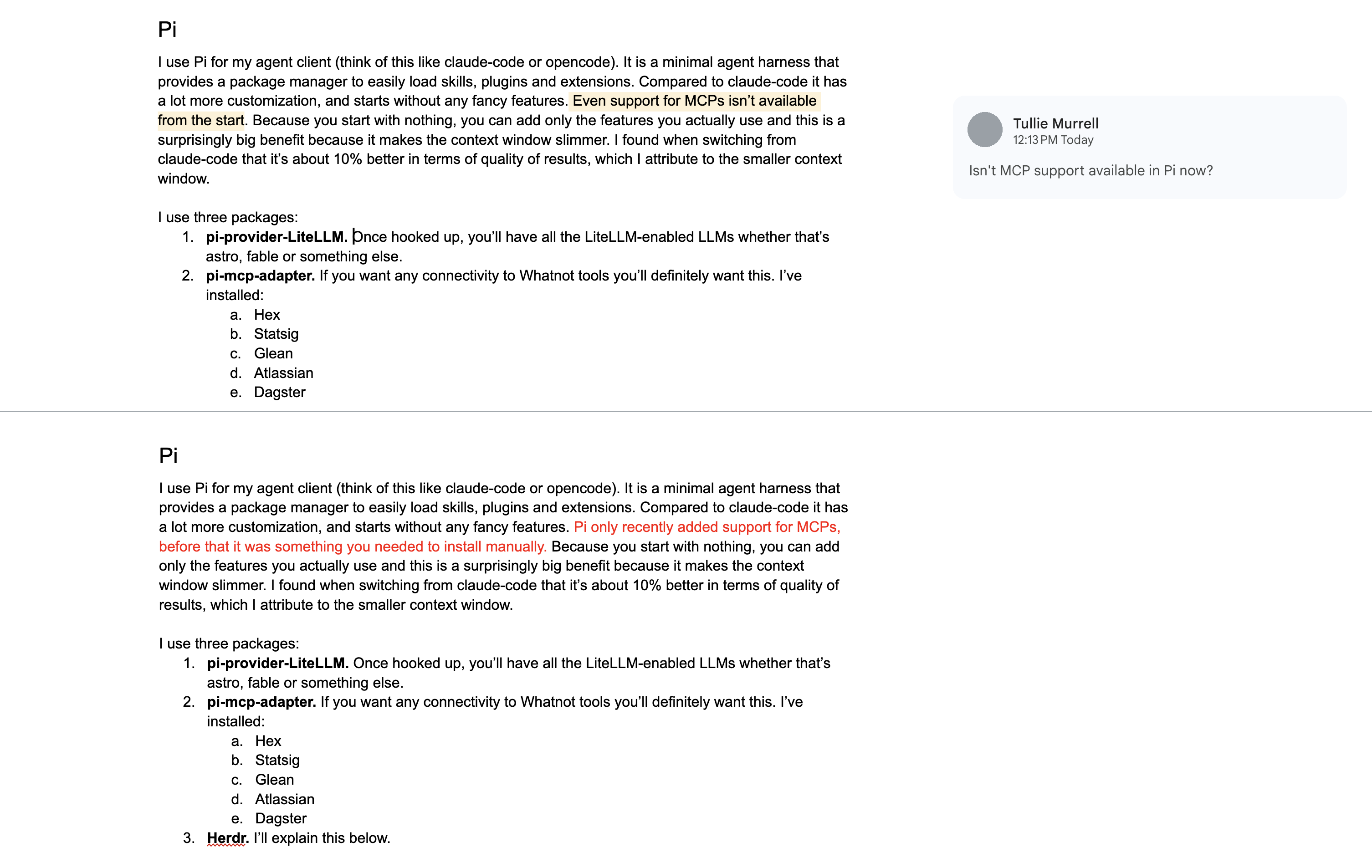
Before and after: a comment on the doc, and the agent’s edit in red.
The broader point: don’t invent a custom workflow for agents. Use the same tools the org already used before AI, Google Docs, comments, redlines. Let the agent write the doc, then comment on it like you would a colleague’s draft.
Setup is two things: a small script that lets agents read and edit Google Docs directly (it takes a few iterations before formatting and images are smooth), and telling the agents the red-text rule.
Code: GitHub is my IDE
Code works the same way, except the IDE is GitHub. Agents write draft PRs, and my review happens in GitHub’s pull request UI: I comment inline on the diff, the agent addresses each comment with new commits, and we iterate there instead of in a chat window. CI runs on every push, so by the time I’m looking at a PR I already know whether it builds and passes tests. I treat these PRs like they came from an intern: heavy scrutiny, many iterations, and eventually work that’s good enough to ship.
The PR becomes the workspace. I don’t need to pull a branch, run the code locally, or ask for a status update. The diff, the comments, and the checks tell me everything. When a PR is ready it merges like any other; when it’s not, the comments say exactly what to fix.
Improvements
Two bottlenecks show up across all of this:
- Offline simulations and benchmarks that actually replicate production. Agents work best with a closed feedback loop that matches where the thing will be deployed. The closer the simulation is to production, the more you can let the swarm run and the more likely its findings are real. On the engineering side that means solid end-to-end tests and fast CI.
- PR review. If you can write a year of PRs in a day, you still have the rest of the year to review them. Most of the supposed efficiency never gets realized.
And two nice-to-haves:
- Remote agents. My agents run locally on my laptop, so running 10 agents over the weekend means the laptop stays open all weekend. Hot tip: make sure your partner knows that the agents, and the value they produce, will be null if the laptop is accidentally closed.
- Mobile. Once you’re AI-pilled you get paranoid, away from the computer, that the agents have stalled. I’d love to check in from my phone between meetings, redirect them, and ask questions against their local knowledge.
Conclusion
None of the tooling above is the hard part. Pi, Herdr, and a working/ directory take an afternoon to set up, and I expect most of it to be replaced within a year. The two things that actually decide whether a swarm of agents produces anything are an offline benchmark that tracks production closely enough to trust, and a review process that can keep up with what the agents write. I have the first for the project I described above. The second is still the bottleneck, for me and for everyone who has to approve my PRs.
So if you take one thing from this: before you spin up 20 agents, spend the time on the loop they’ll iterate against. The agents will fill whatever benchmark you give them.
If you follow this setup, you can be like me and achieve 5 years+ of work in a couple of hours 🙂